
A sewing pattern is full size. A home printer is not.
A sewing pattern is designed at the size a person actually is; a home printer prints on A4. Bridging that gap is tiling — and when tiling is done badly, the finished garment fits nobody. The shop’s tool was producing tiles that didn’t line up. We rebuilt it.
- Services
- Custom SaaS development, E-commerce
- Year
- 2026
Results
17
paper sizes supported (ISO A/B, US)
66%
size reduction on heavy photographic posters via compression presets
~1 week
from scratch to a shipped Windows installer
1 rule
slug-token matching that covers the entire catalogue
What was missing
The shop’s tiling tool, a Go/Fyne build, had PDF fidelity problems — the libraries mangled vector content and shifted regions — a janky Windows UI, misaligned tiles and off-scale prints, and it was fragile to package. A two-millimetre misalignment at a tile boundary produces a pattern that, cut and sewn, fits nobody. Separately, finished patterns still had to be attached to the right WooCommerce product variations one file at a time.
Before
- A Go / Fyne build with PDF fidelity issues from gopdf / gofpdi
- A janky, rough UI on Windows
- Tiles that didn’t line up and off-scale prints
- Fragile to package and distribute
- Patterns attached to product variations manually, file by file
The insight
The tiling problem and the upload problem looked separate but weren’t: a pattern shop has two jobs — cut the pattern correctly, and put it in the right place so the right customer can buy it. For the shop side, one rule covers the whole catalogue: a file belongs to a variation if every one of that variation’s attribute tokens appears in the filename, with ‘all-sizes’ acting as a wildcard. No per-product guesswork about where the size ends and the height begins.
What we built
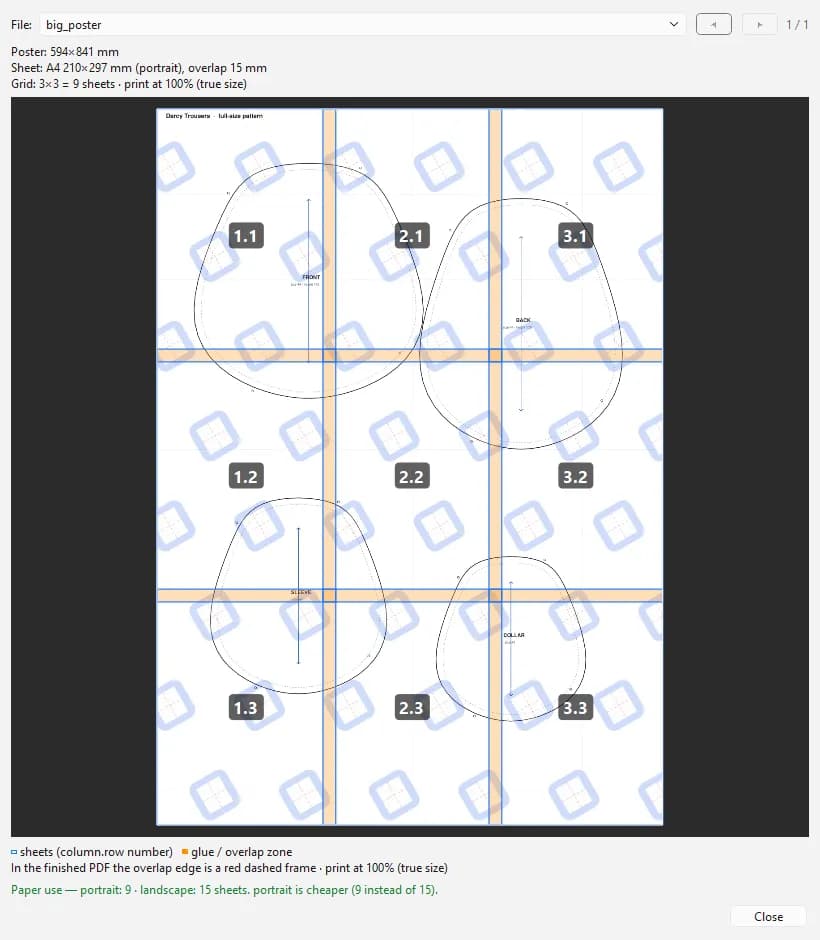
A clean rewrite on PyMuPDF, which clips and places PDF regions at true 1:1 scale — text stays text, cut lines stay lines, nothing is rasterised — behind a one-window native Qt (PySide6) desktop app that remembers your last settings. Before printing, a preview lays the cut grid over the pattern: sheet boundaries, orange glue bands, numbered tiles. It picks portrait or landscape per file to save paper and reports the saving, batch-processes whole folder trees, watermarks each sheet, and can attach a calibration page with a 10 cm test square so the customer verifies their printer before cutting. It ships as a one-click Inno Setup installer needing no Python on the target PC. A companion WooCommerce plugin, Fabrico Pattern Uploader, pushes dozens of finished PDFs into the correct size × height variations in one operation, with a dry-run preview, auto-created variations and paid-only protected delivery.
After
- Vector-accurate 1:1 tiling rebuilt on PyMuPDF — text and lines never rasterised
- A native Qt desktop UI with cut-grid preview, progress and cancel
- A calibration page with a 10 cm square so customers verify scale before cutting
- A one-click Windows installer, no Python needed on the target PC
- Slug-token matching that attaches whole batches to the right variations, idempotently
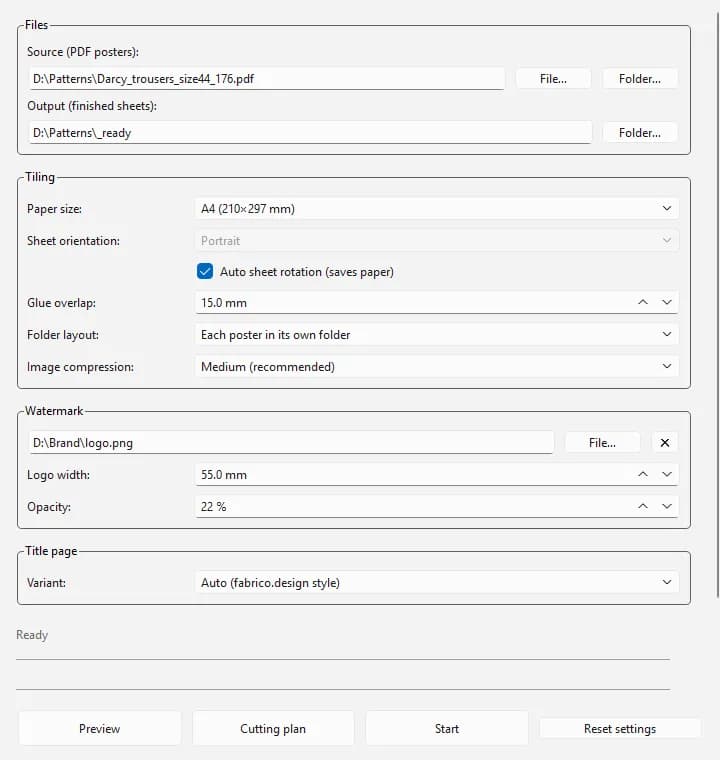
The desktop app: file paths, tiling, watermark and title-page options, with preview and start. 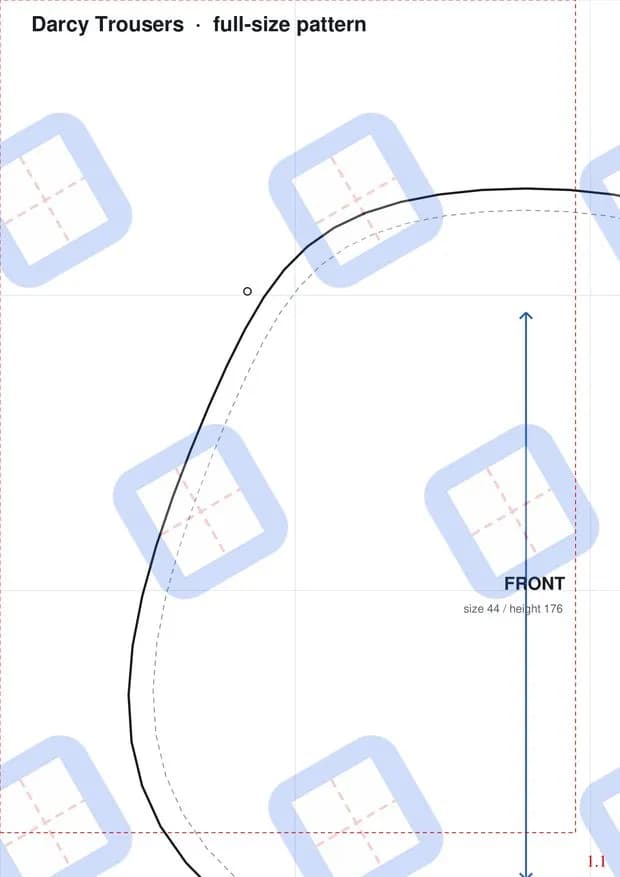
A finished A4 sheet of a full-size trouser pattern, with cut frame, watermark and sheet number.
Stack
Next case
Nobody trusts a dealer’s brochure. They trust other owners.Rippa
Read the caseContact
Want one of these?
Tell us what is not working. We will tell you what we would do about it.
- Response time
- We answer within one working day.
- How we work
- A remote-first team across EU and US time zones. Everything runs online — your meetings happen where your team already is.